
BeebEm to emulator całej gamy modeli mikrokomputera BBC Micro, który zawojował Anglię na początku lat 80 i stanowił groźna konkurencję dla powstałego mniej więcej w tym samym czasie Spectrum i C64. Komputer opracowano z myślą o platformie edukacyjnej (BBC Computer Literacy Project) - Micro stał się bohaterem w programów telewizyjnych, czy też był wykorzystywany jako platforma (Master 128) w jednym z ciekawszych projektów "Doomsday Project" (którego nośnik, śmiało można nazwać prekursorem dzisiejszego CD-ROMU).
![[BBC] BeebEm 4.17 20/06/2021](www/picphoto/8b2eda981.jpg)
Version 4.17 (Chris Needham, Dominic Beesley)
- Writes to the sound chip are now allowed while sound is disabled. This ensures that the sound chip is in the right state if sound is later enabled.
- Fixed sound frequency write. Setting frequency to zero should initalise the counter to 1024.
- The cursor is now disabled based on CRTC register R8 (see AUG p.366). This fixes the cursor display in Wizzy's Mansion and Pedro.
- Debugger improvements:
- Fixed instruction 4B (ALR imm).
- Set the initial input focus so that you can now open the Debugger window and type commands without having to click in the edit box.
- Added 'over' command. This steps over a JSR instruction, i.e., runs to the next instruction in memory after the JSR.
- Added a command to show existing labels.
- Added a command to clear the output window.
- Fixed help output to show all commands and aliases.
- Fixed the 'file' command to allow the full 64k address space to be saved.
- The following commands now prompt for a filename if not given: labels load, save, file, script.
- Mouse input improvements:
- Changed the right mouse button to control joystick button 2, which is useful for games such as Phoenix and Ripcord that use both joystick buttons.
- Fixed the "Hide Cursor" option, which caused the cursor to flicker when using the mouse-stick options.
- Added mouse capture option. To enable, select the "Capture Mouse" menu item and click in the window area. To release the mouse, press Ctrl+Alt.
- Fixed "AMX L+R for Middle" option.
- Fixed bug where Master 512 mouse input would sometimes be reversed. Master 512 configures interrupt on raising and faiilng CBx edges alternately. Instead of guessing which should be next, check selected edge in the PCR register.
- Improved mouse responsiveness when captured.
- Fixed Mode 7 run-length optimisation in the video renderer
- Fixed the teletext font file. The 'W' character had one pixel missing.
- Improved Mode 7 screen capture to avoid distorting the image. Use the 640x512 option for best results.
- Reset double-height state at start of mode 7 screen. This fixes an issue where, if double height is enabled on the last character row of a mode 7 screen, the top row of the screen would also be treated as double height. This effect could be seen in the Twin Kingdom Valley instructions pages.
- Fixed Solidisk Sideways RAM emulation. Writes to RAM bank are selected by User VIA output port B even if the bank selected by &FE30 is writable.
- Fixed Preferences.cfg file backwards compatibility.
- Fixed reading the tube coprocessor selection from BeebEm 4.14 Preferences.cfg files.
- Fixed crash when loading multiple ADFS images from the command line.
- Fixed PrinterEnabled preferences option, which was not being saved/loaded correctly.
- Added BeebEm.user.props.example file and updated the instructions for how to compile BeebEm
Version 4.16 (Chris Needham, Dominic Beesley)
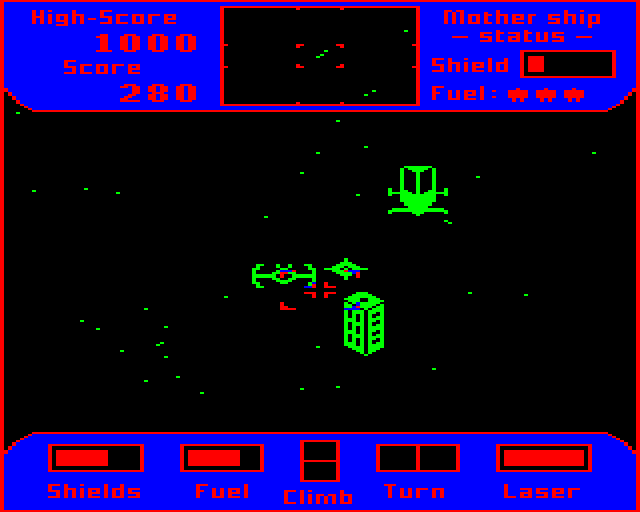
Cylon Attack (A&F Software Ltd., 1983)
- Reintroduced Master 512 co-processor support, following change to the MAME source code license.
- Added Torch Z80 utility discs and renamed ROM files.
- Fixed Integra-B sideways RAM writes.
- Improved Sprow ARM7TDMI co-processor clock speed accuracy.
- Debug watches now update while the emulator is running.
- Fixed disc image auto-boot.
- Fixed Model B MODE 7 emulation with screen memory at &3C00.
- Fixed 6502 opcodes and removed the Ignore Illegal Instructions menu option.
- Repton tape loader now works (instructions: 04, 0C, 14, 1C, 34, 3C, 44, 54, 64, 74, 89).
- Zalaga tape loader now works (instructions: 04, 3C, 44, 54, 5C, 64, 74, 7C).
- 3D Grand Prix tape loader now works (instruction &80).
- KIL instructions are executed repeatedly, to emulate hanging the machine.
- RMBn, SMBn, BBRn, BBSn instructions in 65C02 copro are now implemented.
- Fixed instruction cycle times.
- All 6502 and 65C02 opcodes are now recognised in the debugger.
- Removed the "Incorrect disc type selected" warning dialog, which was reporting false positives on valid .ssd files.
- Include complete video state in UEF save state files.
- Clipboard Paste handling no longer overwrites memory.
- Fixed Music 5000 panning, the left and right channels were reversed.
- Fixed use of Jim page select register with Music 5000.
- Added -CustomData command line option.
→ NOWSZY [BBC] BeebEm 4.19 03/05/2023
BeebEm Version 4.19 (Chris Needham, Mike Wyatt, Steve Inglis, Alistair Cree)
- Fixed NMOS 6502 instructions 6B (ARR imm) and EB (SBC imm).
- Fixed timings for instructions 83 (SAX (zp,X)), 8F (SAX abs), B3 (LAX (zp),Y), and BB (LAS abs,Y).
- Fixed 65C12 instruction timings for ADC and SBC in decimal mode, ASL, LSR, ROL, ROR, and BRA.
- Added keyboard shortcuts for changing text-to-speech reading rate. Enable text output reader by default when text-to-speech is enabled.
- Fixed crash in the debugger, where sideways RAM does not contain a normal ROM image.
- Fixed Econet source code cross-compatiblity issue.
- Serial and tape emulation improvements:
- Fixed serial transmit state: Writing a master reset to the ACIA control register should stop transmitting data. This was causing extra bytes to be written to UEF files when saving to tape.
- The Tape Control dialog Record button now always prompts the user to create a new UEF file, rather than appending to the currently open UEF file. This change also fixes a bug where the button would do nothing if a CSW file was loaded.
- Opening the Tape Control dialog no longer causes Block? or Data? errors during loading.
- The BeebEm version number is now stored in UEF tape files.
- Fixed Master real time clock year handling. The year is stored as the last two digits. Removed the "Master 128 RTC Y2K Adjust" option. Note that the Master MOS still displays years as 19xx, but will accept any century when setting the time using `TIME$`.
- Added debugger support for the BBC Master real-time clock and CMOS RAM.
- Added a new Music 5000 disk image (M5000-4.ssd) that uses a different copy protection patch, to fix the staff editor.
- Added ZipFile project, to create BeebEm.zip distribution. The project runs a Perl script, so requires a working Perl installation.
- The Write Protect On Load menu option is now also applied to files loaded from the command line.
- Improved the Disc Export dialog, which now detects and avoids using file names that are not valid on the host filesystem. The dialog box allows you to double-click an entry to rename files.
- The BeebEm window on Windows 11 is now drawn with rounded corners disabled.
Beebem Version 4.18 (Chris Needham, Alistair Cree, Greg Cook)
- Fixed undocumented 6502 opcodes 2B (ANC imm) and CB (ASX imm).
- Fixed memory reads in undocumented 6502 opcodes.
- Hard disk support improvements:
- * Added new Select Hard Drive Folder menu option. This fixes an issue with the "Options -> Preferences -> Save Disc/Tape/State Folders" menu option which caused BeebEm to remember the last folder used to open disk or tape images. This would also set the folder where BeebEm looks for hard disk images, causing it to create empty
- *.dat files in the last folder used. This change also adds a new HardDrivePath preferences option, separate to DiscsPath. An error is now reported if opening a hard disk image file fails.
- Improved the emulation of the teletext adapter to implement the full range of possible states (field sync, data entry window, and video field). The TFS ROM now acquires pages correctly.
- Fixed key selection in the User Port Breakout Box dialog.
- Fixed 1770 disk emulation to enable automatic disk density selection in Opus DDOS.
- Fixed the Sprow ARM7TDMI co-processor emulation to ensure fetches are word aligned.
- Removed documentation for the Emulator Traps menu option, which has not been implemented yet.
wstecz21/06/2021 00:04

 eebEm is a BBC Micro and Master 128 emulator. It enables you to run BBC Micro software on your PC. BeebEm was first developed for UNIX systems in 1994 by Dave Gilbert and was then ported to Microsoft Windows.
To run the latest Windows version of BeebEm you will need Windows XP or later (v4.03 runs on Windows 98). The UNIX version will run on most UNIX based systems and Linux (the Windows version also runs quite well on Linux using wine). The full source code for BeebEm is included in the downloads and is released under the terms of the GNU General Public License.
BeebEm will run most BBC Micro software including Elite, Exile and Revs. It will also run most BBC Micro ROM software (e.g. Wordwise).
The software page has links to sites where you can download software. You can also download OddJob, a previously unreleased game for the BBC Micro.
eebEm is a BBC Micro and Master 128 emulator. It enables you to run BBC Micro software on your PC. BeebEm was first developed for UNIX systems in 1994 by Dave Gilbert and was then ported to Microsoft Windows.
To run the latest Windows version of BeebEm you will need Windows XP or later (v4.03 runs on Windows 98). The UNIX version will run on most UNIX based systems and Linux (the Windows version also runs quite well on Linux using wine). The full source code for BeebEm is included in the downloads and is released under the terms of the GNU General Public License.
BeebEm will run most BBC Micro software including Elite, Exile and Revs. It will also run most BBC Micro ROM software (e.g. Wordwise).
The software page has links to sites where you can download software. You can also download OddJob, a previously unreleased game for the BBC Micro.