
Tom Walker autor całej masy emulatorów (Arculator, B-em, CPC-em, Elkulator, ReasonableGBA, RPCemu, SNEM, YAAME, ZX82) zaktualizował kod swojego emulatora starych "blaszaków" - komputerów PC klasy XT/AT/286/486 w tym tak "egzotycznych" konstukcji jak Sinclair PC200, Commodore PC30-III czy też Amstrad MegaPC.
![[pc] PCem 1.2](www/picLogoty/pcemu-gui-windows981.png)
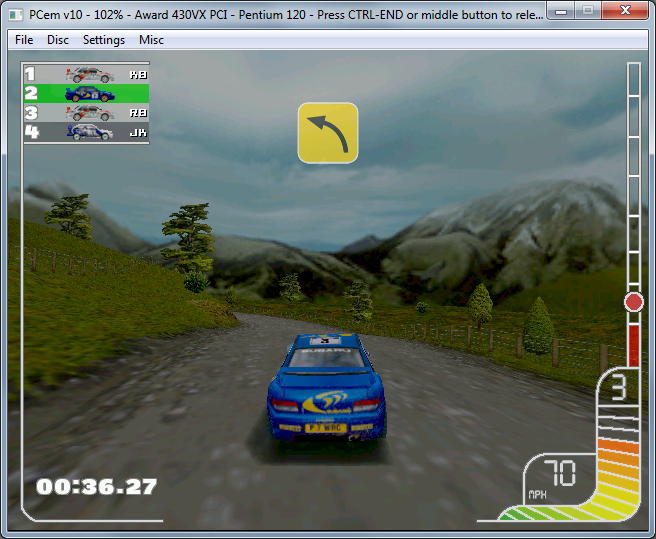
Collin Mcrea pod PcEm. Foto@ProjectPage
PCem v12 released 18th February 2017
- New machines added - AMI 386DX, MR 386DX
- New graphics cards - Plantronics ColorPlus, Wyse WY-700, Obsidian SB50, Voodoo 2
- CPU optimisations - up to 50% speedup seen
- 3DFX optimisations
- Improved joystick emulation - analogue joystick up to 8 buttons, CH Flightstick Pro, ThrustMaster FCS, SideWinder pad(s)
- Mouse can be selected between serial, PS/2, and IntelliMouse
- Basic 286/386 prefetch emulation - 286 & 386 performance much closer to real systems
- Improved CGA/PCjr/Tandy composite emulation
- Various bug fixes
→ NOWSZY [cpc] CPCEmu 2.4.0 29/12/2021
CPCemu 2.4 released 29.12.2021
- Original, but virtual CPC keyboard in 4 different languages. Click/touch at the bottom border to get it.
- Loading firmware ROMs (0 and 255) from the running emulator (setup menu).
- Upgrade to the latest SDL version (2.0.18). If you don't get the virtual keyboard, the on-screen joystick and the graphical main menu you should consider upgrading your installed SDL version.
- Correction of many errors (M4 file names, M4 sockets, sound output, restart of emulation, error tolerance, screen layout, Z80 R register).
→ NOWSZY [cpc] CPCEmu 2.3.2 11/07/2021
CPCemu 2.3.2/1 released 11.07.2021
These are bugfix releases. They correct the following problems:
- File handling on systems with a case-sensitive file system.
- Missing folder "m4" in some Linux packages.
- Outdated online help on Android.
- Sound volume very high.
CPCemu 2.3 released 07.07.2021
- Complete emulation of an M4 Board (http://www.spinpoint.org) using a host directory as drive C: (i. e. SD card; even for SymbOS), including network/internet connections, dynamic ROM simulation and (replaceable) Hack ROM (lower ROM). Many thanks to Duke for providing information and staying patient!
- CRTC emulation of type 0 (register 8) and type 1 (register 6) even better than before.
- HYSNC and VSYNC emulation still a bit improved.
- Online help updated.
- Mouse pointer visible on movements.
- Correction of many small and big errors (in particular, 576 KB RAM work correctly now for the first time after decades) and improved error reporting.
→ NOWSZY [cpc] CPCEmu 2.2 14/03/2021
CPCemu 2.2 released 14.03.2021
- Setup option to use arrow keys as joystick
- Main menu improved for small screens (Android, iOS)
- Improved output in CRT-monitor mode ("Video mode=1", including better window behaviour for desktop versions)
- Improved emulation of the HSYNC signals ("blacker than black", relevant for some demos as Dreamend)
- Fixed errors: Folder sharing on Android, sound output, poke database (Android, iOS)
→ NOWSZY [cpc] CPCEmu 2.1 23/02/2020
CPCemu 2.1 released 23.02.2021
- Once again, I'm happy to present a new version of CPCemu.
New features are:
- Available also for Linux-x86 (32 Bit) and (soon) Linux-ARM64 (64 Bit)
- Further features of CRTC (types 0 and 1) and Gate Array implemented (e. g. behaviour of register 6, and the colours)
- User interface improved: text size on Android and iOS, Drag & Drop of DSK files on Windows, MacOS and Linux
- The versions for Android and iOS accept DSK and ZIP files from other applications (e. g. downloads from the browser)
- Further features of the disk controller (FDC) implemented (Orion Prime in the 4 disk version loads correctly now)
- Multiple improvements (e. g. autostart, green monitor, cassette relay)
→ NOWSZY [cpc] CPCEmu 2.0 7/01/2020
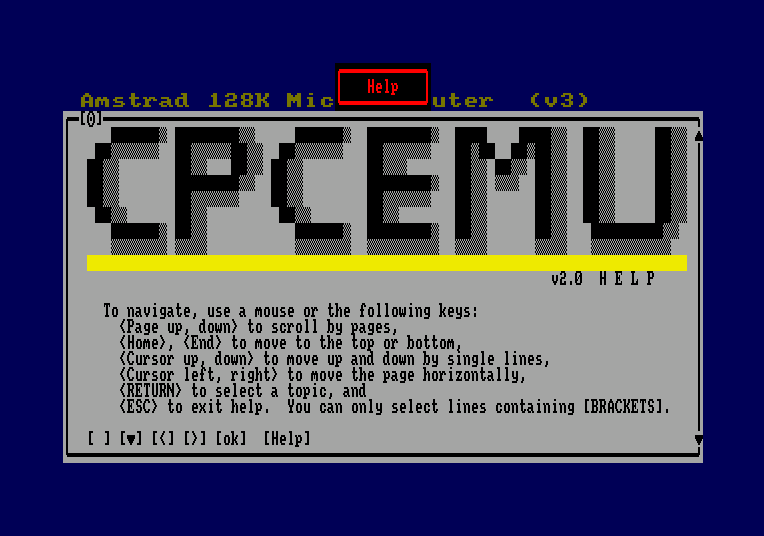
Nieładne? Nie.... funkcjonalne? Całkiem, całkiem, na pewno nostalgiczne;)
CPCemu 2.0 released 07.01.2021
I'm proud to present the latest release of CPCemu. It deserves a new major version number.
These are the features of version 2.0:
- Runs on MacOS, Android, iOS, Linux (x86_64 and ARM, in particular on Raspberry Pi) and Windows
- Graphics engine overhauled, introducing border, overscan, dynamic horizontal synchronisation (not perfect yet), scan doubling and some optional CRT blurring
- Completely new CRTC (CPC's graphics chip) emulation, quite accurate, and selectable between CRTC types 0, 1 and 2 (most demos work as on a real CPC)
- Realistic timing of CPU instructions and interrupts
- Sound emulation significantly improved, now able to play digitized sounds (such as speech and special effects)
- Different accelerated modes of operation ("Turbo", with and without CRTC synchronisation)
- Debugger with optional CRTC single-stepping alongside the CPC screen, including crosshairs indicating the current electron beam position
- Graphical menu (in addition to function keys)
- Virtual on-screen joystick on Android and iOS
- Keyboard configuration improved, enabling easier customization
- Many small improvements (e. g., correct handling of CPU register R, support for ZIP file archives without external "unzip", V3 Snapshot files) and bug fixes (e. g., floppy disk controller now correctly reads strange sectors such as Speedlock)
→ [pc] PCemu 0.9
PCem v9 4th October 2014
- New machines - IBM PCjr
- New graphics cards - Diamond Stealth 3D 2000 (S3 ViRGE/325), S3 ViRGE/DX
- New sound cards - Innovation SSI-2001 (using ReSID-FP)
- CPU fixes - Windows NT now works, OS/2 2.0+ works better
- Fixed issue with port 3DA when in blanking, DOS 6.2/V now works
- Re-written PIT emulation
- IRQs 8-15 now handled correctly, Civilization no longer hangs
- Fixed vertical axis on Amstrad mouse
- Serial fixes - fixes mouse issues on Win 3.x and OS/2
- New Windows keyboard code - should work better with international keyboards
- Changes to keyboard emulation - should fix stuck keys
- Some CD-ROM fixes
- Joystick emulation
- Preliminary Linux port
→ [pc] PCemu 0.8
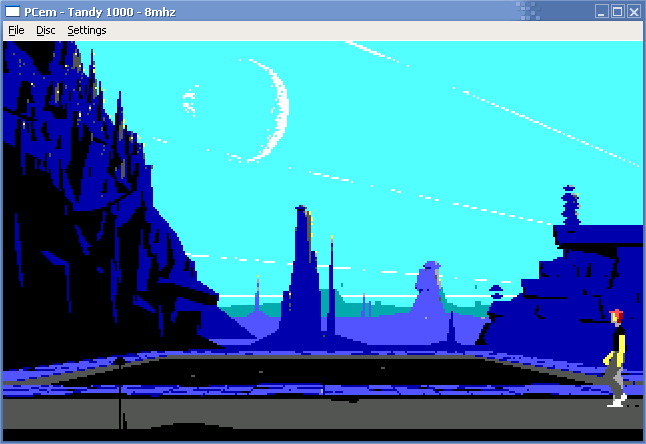
PCem v8 released 20th December 2013
- New machines - SiS496/497, 430VX
- WinChip emulation (including MMX emulation)
- New graphics cards - S3 Trio64, Trident TGUI9440AGi, ATI VGA Edge-16, ATI VGA Charger, OAK OTI-067, ATI Mach64
- New sound cards - Adlib Gold, Windows Sound System, SB AWE32
- Improved GUS emulation
- MPU-401 emulation (UART mode only) on SB16 and AWE32
- Fixed DMA bug, floppy drives work properly in Windows 3.x
- Fixed bug in FXAM - fixes Wolf 3D, Dogz, some other stuff as well
- Other FPU fixes
- Fixed serial bugs, mouse no longer disappears in Windows 9x hardware detection
- Major reorganisation of CPU emulation
- Direct3D output mode
- Fullscreen mode
- Various internal changes
wstecz19/02/2017 21:02
 his is a new emulator for various old XT-based PCs.